Agent accounts: several Claude or Codex logins on one machine
Status: implemented (openbus/accounts.py, web/m/accounts.js). Approved from the
playable prototype in the scratch previews (accounts/).
Why
The motivating case is one person with a personal Claude plan for open-source work and a
company plan for company work, running both at once, never logging out and back in.
Claude Code and Codex already support this: each config dir (CLAUDE_CONFIG_DIR, default
~/.claude; CODEX_HOME, default ~/.codex) is its own login, settings and transcripts.
A pane’s account is fixed by the environment its agent started with, so nothing ever
“switches”. tmux-rc already read that variable from each agent process, and meters,
transcripts and Expunge followed it. What was missing was naming the accounts, choosing
one for a new pane, and adding a second one without leaving the phone.
The model: a profile is a provider plus a config dir
Profiles are discovered, not configured: ~/.claude, every ~/.claude-<name>,
~/.codex*, any dir a live pane uses, and any dir added through the UI. A dir is listed
once someone is signed in there, or once it was added here (then it shows as “not signed
in” until the sign-in finishes).
A pane running on another HOME’s default dir is not one of them: that is someone else’s
setup, whose name tmux-rc could not read (its .claude.json sits beside the dir, under that
HOME) and which no launch could pin with the config variable alone, so it is left out
rather than listed half-working.
A profile is named by the user’s label, else by the non-secret oauthAccount fields in
the dir’s .claude.json: the organisation name, with a personal plan’s
“
Names alone hide one failure: a /login run in a pane without CLAUDE_CONFIG_DIR signs
the default dir in to whatever login was chosen, and a labelled dir keeps its label while
holding the same login as another. Nothing then shows that two “accounts” are one, or that
a login has vanished. So each profile also carries its login’s email, shown as secondary
text wherever an account is listed, and two dirs on one login (the same account and
organisation ids) flag each other: the Accounts sheet warns on both rows, and the Move sheet keeps
such a target listed but says the copy would stay on the same login and its limits. Hiding it instead would leave
the user wondering where the account went. Neither the email nor the shown name is the key:
one email in two organisations is two plans, and names are display values, so without an
organisation id no match is claimed.
The credentials file is never opened by this code: Codex keeps no non-secret identity
file, so only the presence of its login file is checked. The old meter labels (the email’s
local part, or the full email on a clash) are gone: for one person with two plans they put
the same full email on every meter.
The store ($XDG_STATE_HOME/tmux-rc/accounts.json) holds only what discovery cannot
know: labels, a colour index per dir, and forgotten dirs. Colours are handed out on first
sight (the lowest unused) and kept, so adding a third account never recolours the first
two.
The single-account rule
Account UI appears only once a provider has two or more signed-in accounts, and the test is per provider. With one Claude and one Codex account nothing changes from before: no badges, no picker, no filter, no grouping in Plan usage, no account on the consent card. With two Claude accounts and one Codex, Claude panes get badges and Codex panes do not, because the Codex icon already says which account it is. Most people have one account each, and for them account chrome would only be noise and something to misread.
The one addition everyone sees is Accounts in Settings, because adding a second account has to start somewhere. It lists each account and opens the Accounts sheet from Manage accounts…, on a phone (the header’s gear) and a wide screen (the sidebar’s Settings) alike; see sidebar.md .
Showing it
- Badges ("● Work") on the phone’s rows, the sidebar’s rows and the pane header, in the account’s colour. The pane header puts it first on a phone, which ellipsizes the end. Every place that names an account draws this one chip, so the same account never looks two ways on one screen; a long name truncates inside it.
- Session cards on the dashboard carry the chip of the session’s own default (the dir its tmux environment sets), and nothing when it sets none or sets what the global environment already does: a session that starts new windows on an account other sessions do not is worth seeing at a glance; a default every session shares is not.
- Usage strip: one card per window (plan-usage.md) in one row that swipes, most urgent first (full soonest, then the highest pace at the reset). Each card names its account by the rows’ chip, then the window ("● Work · 7d") on its own short line, rather than a chip in a meter’s corner. On a real phone, a chip under every bar gauge read as noise, and a heading per account over a grid made the strip two thirds of the screen. A name in the window’s title was tried first: it was truncated first and read as part of the window (“7d QSI”). The card’s line has room for both, and it never truncates.
- Dashboard Plan usage: wide, every meter on one line, grouped per account with one thin divider between groups. Each group is headed by its chip, flush left over its first meter, with the details (who, plan, dir, panes) in its tooltip, and Codex gets a chip like the rest. The meters share the line evenly, down to 130px each, which fits ten on a 1500px card; below that the line scrolls with the strip’s edge fades rather than wrapping. A wrapped second row looked broken: its chips floated in the gap, and its groups did not line up with the first row’s. Chips centred over their groups, on the heading line to save a row, read as loose labels rather than headings, so they now take a row. The chip names the account once over its meters, so the meters carry none. A phone’s dashboard uses the strip, a chip on each meter.
- Filter is a list filter, so it sits with the list’s other one rather than in Settings:
on wide, an “Account” group (All accounts, then each account, several at once) under
“State” in the filter button’s menu beside the search box, combining with it (Working +
Work is Work’s working panes), the button counting what is on. A phone has the same
button beside its search, opening the menu as a bottom sheet. While on, the account’s chip shows under search, labelled “Account”
beside the “State” and “Search” chips (
State ● Working ✕ Account ● Work ✕ Search "api" ✕, the search in the URL asq=api), so one line says everything narrowing the list; a phone’s list shows no chips (the button’s count and the list’s foot say it), and on its dashboard (no search there) the account’s chip sits under the header. It applies to the list, the strip and the dashboard, Open loops included: a loop shows only if a pane on the account holds it, so a PR or worktree with no pane, which no account owns, is hidden while filtered. It lives in the URL beside the state filter as comma lists (#filter=working,finished&acct=claude-work,claude, each account its dir less its usual~/.: unique, unchanged by a rename, and readable; a comma inside a dir is escaped), not in localStorage: reload, a shared link and Back/Forward restore it, one source of truth for both filters. Picking replaces the history entry, as the state filter does, so Back leaves the screen instead of replaying taps. A bare URL (the installed app’s launch) starts unfiltered, as the state filter always has: a filter remembered silently across launches would hide panes that need you. - Consent card: a chat action on a pane names the account the pane runs on, and says that sending never changes it.
Choosing the account for a new pane
The mechanism is a default account per tmux session:
tmux set-environment -t <session> CLAUDE_CONFIG_DIR <dir>. tmux hands it to every window
created there afterwards, a typed prefix c and a resume included. It is what a user
would do by hand, and it stays visible in tmux. New session preselects the session’s
default and always shows a “Default for this session” control. When nothing sets the
variable (unset, or removed with -VAR), it says so (“no account default; new windows use
Work, the standard dir”) rather than implying a choice nobody made.
Launching on an account wraps the launcher in env CLAUDE_CONFIG_DIR=<dir> (or
env -u CLAUDE_CONFIG_DIR for the default dir), so the pick holds whatever the session’s
default is. Unset rather than set for ~/.claude: Claude Code reads ~/.claude.json
beside the default dir, but <dir>/.claude.json inside an explicit one, so setting the
variable to ~/.claude would look signed out. A resumed Claude session is pinned the same
way to the dir its transcript is in, since it resumes only under the account that owns
it; agent-history now indexes every ~/.claude* dir so those sessions are offered at all.
Adding an account
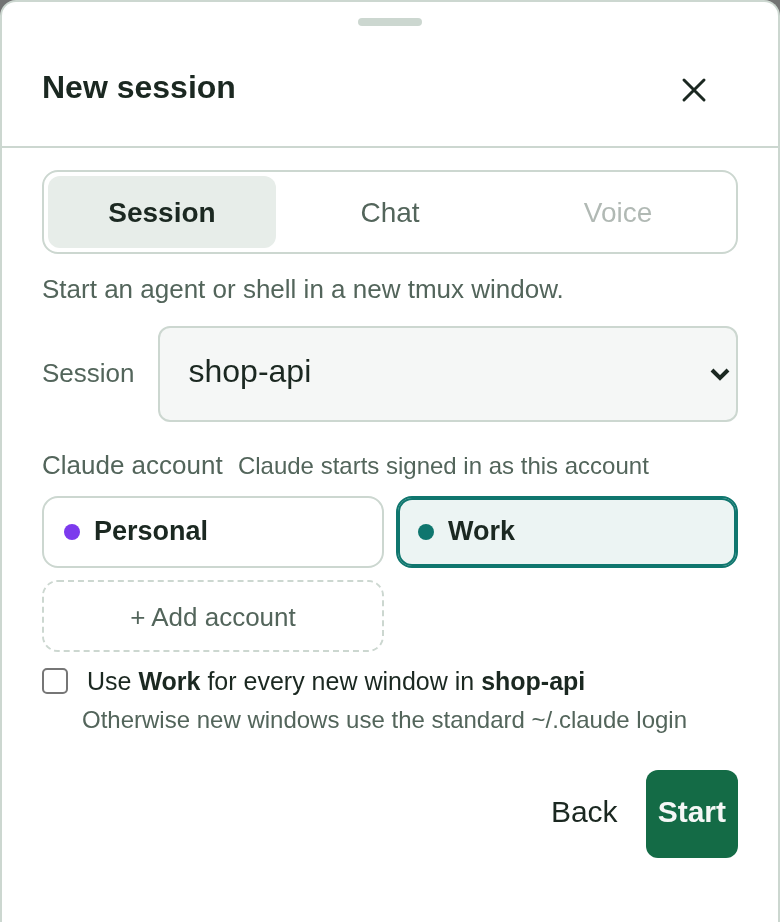
From Settings → Manage accounts… → Add account, or “+ Add account” in New session’s picker:
- Name, provider and dir. The dir is suggested as
~/.<provider>-<name>and stays visible and editable, because the dir is the account. One already listed stops the step. An existing dir is reused as it is; a new one is created with mode 700. - Share your setup (optional). Symlink individual files from the provider’s default
dir (
CLAUDE.md,skills/,hooks/,statusline.sh) so there is one copy to edit.settings.jsonis off by default because it often carries work-only hooks, MCP servers or permissions. The login,.claude.jsonandprojects/are listed as never linked. - Sign in. tmux-rc opens a normal new window running
CLAUDE_CONFIG_DIR=<dir> claude(orCODEX_HOME=<dir> codex login), and the user signs in there:/loginin Claude, while the Codex command is the sign-in itself. Every flow has to finish in a browser on another machine, since tmux-rc users are remote. Claude’s/loginshows a link whose page hands back a code to paste into the window. Codex offers two ways. With a device code (--device-auth) it shows a link and a one-time code, but a ChatGPT workspace can disable device codes. Its browser sign-in instead redirects to a callback on this machine’slocalhost:1455, which the remote browser cannot reach. The user pastes the failed address into the sheet, and the daemon replays it to the waitingcodex login. That replay is the one place tmux-rc touches part of a login: a one-time code that only thecodex loginholding its PKCE verifier can redeem. So the server accepts exactlyhttp://localhost|127.0.0.1:1455/auth/callback?…and sends it as a GET to that port. It follows a redirect only once, and only to that same local server (see below). It answers only success or a plain reason for failure, and logs neither the code nor the state. It also requires a sign-in window this daemon opened, so the endpoint is no general proxy. The alternative was to tunnel the remote browser’s request to the callback. That would need a listener on the user’s device, and the paste costs one step. The sheet reads the sign-in link (and a device code) off the window’s screen and offers it as a button, with the paste field beside it. Leaving the sheet to find the link is what lost the field before, and the field is on the window’s own card too. Eachcodex logingets a fresh OAuth state, so an address from an older window’s link can never work. The server compares the pasted state with the one in this window’s link before sending it, and maps Codex’s own refusal to that same plain reason. The sheet also lists other sign-in windows open on the account so they can be closed. A successful callback answers with a redirect to Codex’s success page, andcodex loginexits only once that page has loaded, so the server loads it too. It follows only a redirect to the same local server, never one to another host. The whole line is editable (to add a flag the provider grows), but the server accepts it only if its one leading assignment is the provider’s variable on this account’s dir and its program is the provider’s own binary, and runs it as argv with no shell, so an edit can neither inject a command nor sign a different dir in. The sheet checks the same rules as you type, to say why before the server refuses. Codex is signed in whenauth.jsonexists or, failing that, whencodex login statussays so: its login can live in the OS keyring instead, where no file shows it. Apart from the replayed callback, tmux-rc never shows a password field, never handles a token and never drives the login; it only polls the dir’s non-secret account info until it appears. That keeps the credential boundary where the provider put it. - Done: the identity read from that info, and a pre-ticked “make it the default for session X”.
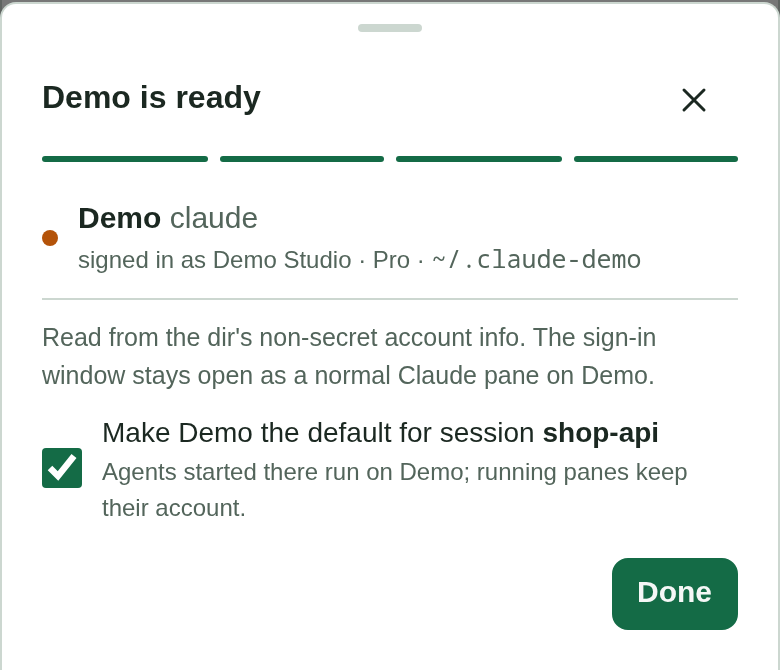
The whole sequence, each step cropped to its sheet, is the accounts-add-* set in
scripts/screenshots.mjs, shot against the demo fleet with a stub sign-in screen.
Edge cases: an abandoned sign-in (Cancel, or its window closed) adds nothing beyond the
listed “not signed in” dir, with Finish sign-in and Remove. Rename changes only the label.
Remove takes the account off tmux-rc’s list; the dir, its login and its transcripts stay
on disk and running panes keep running. The default ~/.claude and ~/.codex cannot be
removed.
Moving a session to another account
A plan runs out mid-task, or work started on the wrong account. Pane “…” → Move to
another account… (shown only when the pane’s provider has two or more signed-in
accounts) lists the provider’s other accounts. Picking one copies the session into that
account’s dir and opens a new window in the same tmux session and cwd running
CLAUDE_CONFIG_DIR=<dir> claude --resume <id> (codex resume <id> under CODEX_HOME).
It is a copy, never a move. The source pane keeps running and is never killed, and the original transcript stays readable on the old account; the user exits the old pane when they choose. Moving files out from under a running agent would break it, and a copy that turns out wrong costs nothing to delete, while a lost transcript cannot come back. From then on the two diverge under one session id, each in its own dir, which is the same thing as resuming one session twice and confuses nothing that looks a session up by its dir.
What is copied is decided by testing what --resume needs, not by copying the whole
session’s footprint. The transcript alone is enough: a second, logged-in account given
only the .jsonl answered from the conversation’s context, with nothing tying the session
to the account that started it. The <id>/ folder (subagent transcripts, externalised
tool results) and file-history/<id>/ (the /rewind snapshots) come along so the resumed
session is whole. Session env, tasks, todos and the process registry are rebuilt on start
and are left behind. Codex needs only its rollout files, a resumed thread’s later
segments included; its sqlite index finds an unindexed rollout by scanning. The list is a
subset of Expunge’s per-session table, so one table says where a session’s files are. The
source keeps running while it is copied, so a record it was still appending is cut from
the end of each copied log: the agent only appends, so the rest is whole, and a resume
reads whole lines. Stopping the source first was rejected, since the move exists for an
agent the user is still in the middle of.
An older copy of the session already on the target (an earlier move, or one made by
hand) is never overwritten silently. The API refuses with 409 and the copy’s age, and the
sheet asks: Replace it deletes that session id’s transcript, <id>/ folder and
file-history there, and nothing else, then copies afresh; Resume that copy opens it
as it is. Either is an explicit flag on the request, so a client that does not know about
the choice still gets the refusal. Replacing gives up the older copy before the new one
lands, which is acceptable because the original it came from is still on the source
account. Resume needs that copy’s transcript, not just any of its files. No move at all,
and so neither choice, is offered for a copy that an agent is running on the target right
now: Claude’s registration of it there (one that can’t be read counts, since it could be
this session), a process holding one of its files open (Codex’s
app-server keeps the rollout open), or, in the moment before either exists, the session
id on a command line, as a move’s resume has: replacing
files under a live agent strands its later writes, and resuming it twice puts two agents
on one transcript. Moves run one at a time, through the new window’s launch until its agent shows as
running, so two
requests cannot pass these checks together, and the sheet takes one tap at a time. A copy
that fails partway is removed. Nothing is written or deleted through a folder
in the target that links out of it, a session whose own files include a link is refused, and the agent’s command is checked to exist before
anything is copied, so a resume that cannot start leaves no stray copy. The pane’s own
account is refused too, compared by identity so no spelling, link or bind mount slips by, and the sheet reloads the accounts
before listing them, since a window the move itself just opened may not have been
attributed to its account yet.
Once the new window runs, the sheet offers Exit the old pane: it types the agent’s own
/exit into the source pane, bound to its incarnation and the session id, and is refused
if either changed. It is a button, not automatic, and never a kill, so an agent mid-turn
is not cut off without the user deciding to.
A session with no transcript yet (registered, nothing written) is refused rather than opened as an empty resume, and so are two dirs where one sits inside the other, which would make the copy chase its own output. A dir that has never opened the folder shows the provider’s own “trust this folder” prompt in the new window first. Answering it is left to the user rather than copied over from the old account, because it is a security decision the provider asks per account. Like Expunge, the request is bound to the pane incarnation the menu was drawn for, and it is audited with the session id and the target dir.
Safety
- No credentials file is ever shared, copied or linked, and discovering, naming or adding an account never reads one. The Plan usage meter is the exception it always was: it reads each metered account’s OAuth token in-process to fetch its limits (plan usage ), now for every listed account rather than only those a pane uses.
- Nothing switches accounts automatically, and nothing routes work to “the plan with headroom”. A full plan is shown, never worked around.
- Login and logout stay in the provider’s own UI.
Alternatives considered
- Guessing the account from the repo or cwd: rejected, a wrong guess silently bills the wrong plan.
- Linking whole dirs between accounts: rejected, it silently shares the login.
- A login form or token paste in tmux-rc: rejected, it moves the credential boundary into tmux-rc.
- Per-account rows in the strip: rejected, several accounts push the list off a phone.
- Moving (not copying) a session between accounts: rejected, see “Moving a session” above.