How the whole system works
Status: implemented — an end-to-end tour of tmux-rc as it actually runs today, from a tmux pane on a dev box to a live, colored terminal on a phone. Start here; the other design notes go deep on individual pieces.
The one idea
Observe the terminal, not the agent. tmux-rc never integrates with Codex, Claude Code, Gemini CLI, OpenCode, or any specific tool. It watches what a tmux pane renders — the same pixels a human sees — and sends keystrokes back, exactly as a human would. Everything below follows from that: the daemon is an observer with a keyboard, tmux is the system of record, and the phone is a dumb remote. No tool ever knows tmux-rc exists.
    flowchart LR
  phone["phone PWA"]
  subgraph gcp["Google Cloud"]
    iap["IAP<br/>(identity-aware proxy:<br/>Google SSO gate)"]
    relay["tunnel relay<br/>(Cloud Run)"]
    iap --> relay
  end
  subgraph host["dev box (as the user)"]
    tc["tunnel-client<br/>(dials OUT, holds the WS)"]
    daemon["tmux-rc daemon<br/>(watcher + FastAPI)"]
    tmux[("tmux server<br/>panes = agents")]
    llm["small LLM parser<br/>(Gemini Flash Lite)"]
    tc <-->|"localhost HTTP"| daemon
    tmux -->|capture-pane| daemon
    daemon -->|send-keys| tmux
    daemon -->|pane text| llm
    llm -->|structured JSON| daemon
  end
  phone -->|"HTTPS + Google login"| iap
  tc -.->|"dials out, then relay<br/>forwards reqs down the WS"| relay
Why the traffic flows this way. The daemon has no inbound port — nothing to
port-forward, nothing exposed. Instead the tunnel-client process (running on the dev
box, as the user) dials outbound to the Cloud Run relay and holds a WebSocket open.
The phone hits https://<slug>.<tunnel-domain>; IAP (Google’s identity-aware proxy) gates
that with Google SSO before any request reaches the relay, and an owner-gate check
confirms the logged-in identity owns the slug. Authorized requests are then serialized
and forwarded down the held WebSocket to the tunnel-client, which replays them against
the daemon on localhost and pipes responses back up. So: two auth layers (IAP SSO +
owner-gate) in front, no open port behind, and the daemon still holds no privileged
position — it runs as the user, drives the user’s own tmux socket, and a human can
stay attached to the same session at the same time.
The pieces
- tmux — the system of record. Every pane is a running program (an AI agent, a
shell). tmux-rc reads panes with
capture-pane(non-disruptive, works from an unrelated process) and injects input withsend-keys. Nothing here holds a pty. - The watcher — a background poll loop in the daemon. Each tick it captures the target panes, decides whether anything meaningful changed, and (when it did) asks the LLM to turn the raw screen into a structured card. See the observation loop .
- The parser LLM — a small, cheap model given a context-cached prompt. It reads a screen of terminal text and returns JSON: a headline, an activity state (running / waiting / idle), a pending question with its options, a task list, links, status entries. It is vendor-agnostic by construction — it identifies the tool from on-screen chrome, not an API.
- The FastAPI server — serves the PWA and a small JSON API (
/api/state, per-pane endpoints for events, snapshots, live frames, and input). Runs on the event loop; the watcher runs its blocking work in a worker thread. - The PWA — a no-framework, no-build vanilla-JS single page. A session list, the selected pane’s Overview, and its raw terminal streaming live.
- The tunnel — the daemon has no inbound port. A tunnel-client process dials out to
a Cloud Run relay over a WebSocket; the relay forwards phone HTTP requests down that
socket and pipes responses back. The phone reaches
https://<slug>.<tunnel-domain>; IAP + an owner-gate authorize it. Detailed below.
Worked example: how a phone request reaches localhost
This section describes one deployment, not a requirement. The daemon speaks plain HTTP on loopback and does not know or care how you reach it. What follows is the authors’ own setup — a private relay fronted by Google IAP — written out end to end because a concrete chain explains the shape of the problem better than an abstract one: outbound-only connection, authentication strictly in front of the daemon, and a pipe that carries whole request/response pairs.
You are not expected to reproduce it. Tailscale, a Cloudflare Tunnel with Access, and any other authenticating front end all fill the same role — see Reaching the daemon from outside localhost . Read the properties in “Consequences worth internalizing” below as the bar any alternative should clear.
No inbound port on the dev box, and two auth layers in front. A single phone request makes this hop chain:
    sequenceDiagram
  participant Ph as phone (browser)
  participant IAP as IAP (Google SSO)
  participant R as relay (Cloud Run)
  participant TC as tunnel-client (dev box)
  participant D as daemon (localhost)
  Note over TC,R: at startup: tunnel-client dials OUT,<br/>holds a WebSocket open to the relay
  Ph->>IAP: HTTPS GET /api/... (Google session cookie)
  IAP->>IAP: SSO gate — reject if not signed in
  IAP->>R: authorized request
  R->>R: owner-gate: does this identity own <slug>?
  R-->>TC: forward request DOWN the held WebSocket
  TC->>D: replay as localhost HTTP
  D-->>TC: response
  TC-->>R: response UP the WebSocket
  R-->>IAP: response
  IAP-->>Ph: HTTPS response
Consequences worth internalizing — these are the properties to look for in whatever front end you choose, not artifacts of this particular one:
- The connection is outbound-only. Nothing listens for the internet on the dev box; the tunnel-client initiates and keeps the socket. A reboot or network blip just means it re-dials (with backoff) — the relay is stateless about any one client.
- Two gates, both before the daemon. IAP’s Google SSO stops anonymous traffic at the edge; the relay’s owner-gate binds the authenticated identity to the specific tunnel slug. The daemon itself trusts that whatever arrives over its localhost socket is already authorized (loopback-only claims, same trust model as its audit log).
- The relay is a dumb pipe. It serializes whole HTTP request/response pairs over the WebSocket — it does not stream, which is exactly why live mode uses long-poll rather than a phone-originated stream.
- Nothing here is load-bearing for the daemon. It has no notion of relays, slugs, or identity headers beyond one loopback-only trust claim for the audit log. Swap this whole chain for a Tailscale address and the daemon behaves identically.
The observation loop
The watcher is the heart. It is deliberately not real-time — its cadence exists to feed the LLM economically, not to drive the eyes (that’s live mode’s job, below).
    flowchart TD
  tick["every tick"] --> cap["capture-pane (all panes)"]
  cap --> fp["fingerprint:<br/>strip volatile churn<br/>(timers, spinners, token counts)"]
  fp --> changed{"changed vs<br/>last fingerprint?"}
  changed -->|no, and no heartbeat due| reuse["reuse cached card<br/>(just tick idle timer)"]
  changed -->|yes, or heartbeat| parse["LLM parse<br/>→ structured card"]
  parse --> store["update per-pane state<br/>+ append to events log<br/>+ ring-buffer snapshot"]
  reuse --> serve
  store --> serve["/api/state serves the cards"]
Two subtleties that everything downstream depends on:
- The fingerprint. A working agent repaints constantly — a spinner, a ticking
2m 3s, a climbing token counter — without the content changing. The watcher strips those volatile bits before asking “is this a new screen?”, so the LLM fires on real changes, not animation. (The same volatile set is deliberately not stripped in live mode — there, you want the spinner to spin.) - tmux is the state; caches are bounded observations. The events log and the snapshot ring buffer live in memory. The snapshot ring is lost on restart; each card and the tail of its events log are checkpointed, but restored only when the pane’s visible screen still has the same fingerprint (activity-clock-persistence.md ). Otherwise the recovery path is re-observation, not a saved file. This is the load-bearing rule of the whole project (see the activity-log design for why it justifies caching at all: TUIs redraw in place, so scrollback is not a faithful record of what was observed).
What the phone shows
One front end, served at /m/ (/ redirects there), over the JSON API. It is laid
out for a thumb first and widens into three columns — sessions, Overview, terminal — when
the window has room, so a desktop browser gets the same app rather than a second one.
A New session dialog starts a fresh agent in a session — the entries come from
TMUXRC_LAUNCHERS.
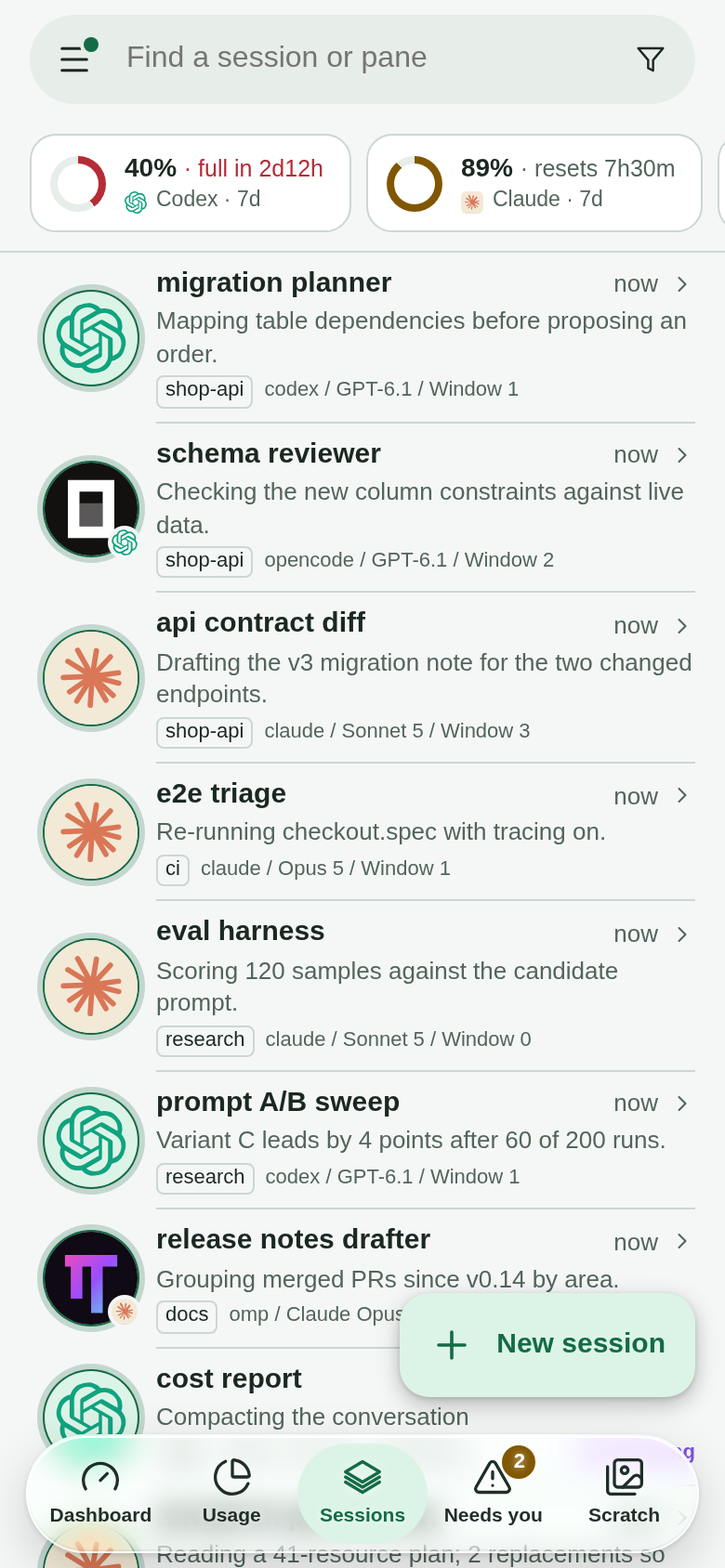
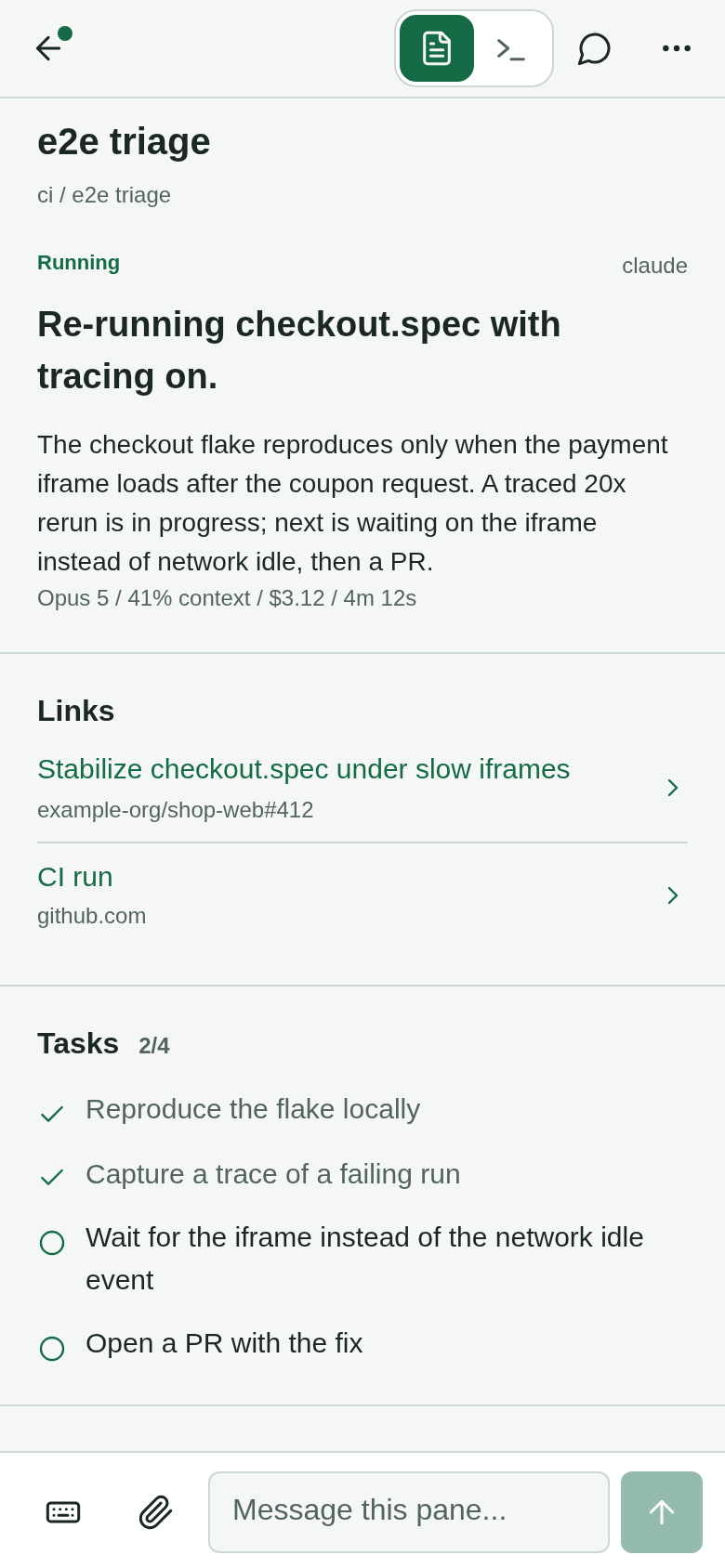
On a phone the layout splits the same data across two screens instead of layering it. A session list groups every pane under its tmux session, one row each — agent name, activity badge, and the one-line summary — with a search box, a recency sort, and a bottom bar that filters to All, Running, Recent, or Needs you (the panes blocked on a question). Tapping a row opens that pane on its own screen, where Overview carries the headline, the summary, the model and the share of its context window used, the sub-agents it spawned, and the timestamped activity list:
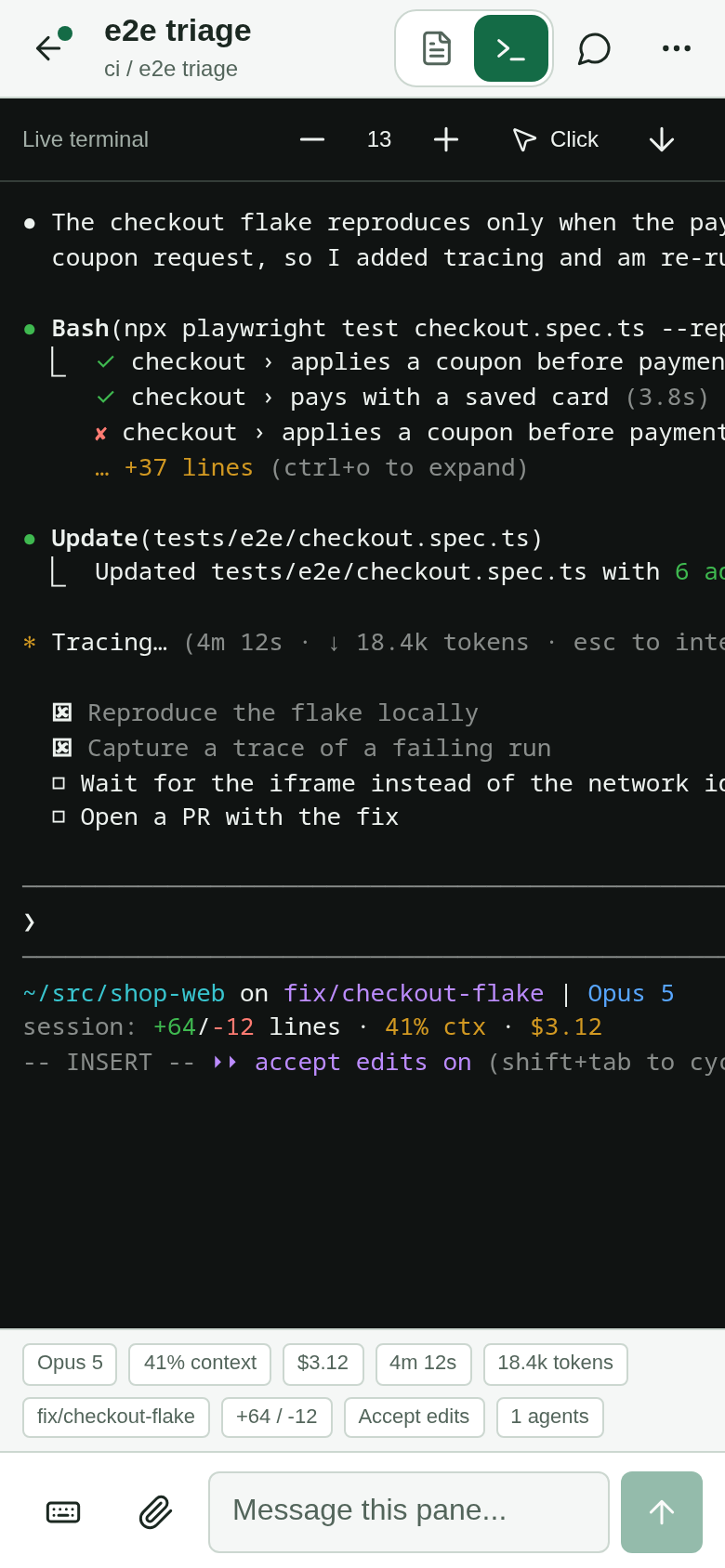
The Terminal tab on that same screen is the live pane, rendered in colour. Because a phone keyboard has no Esc, Tab, arrows or Ctrl, a horizontally scrolling key row sits above the composer and sends them — including the tmux prefix, so the pane’s own tmux bindings stay reachable:
    flowchart TD
  poll["poll /api/state (2s)"] --> cards["render list + Overview<br/>+ meta chips"]
  subgraph peek["Terminal view"]
    live["long-poll /api/panes/{id}/live"]
    live --> render["terminal.js:<br/>SGR → colored spans<br/>+ link anchoring"]
  end
  cards --- peek
  input["composer: text · keys · image"] --> send["POST /send or /image"]
  send --> tmux2[("tmux send-keys")]
Input is a single persistent bar targeting the active pane: type text, tap special keys (Enter, Esc, Ctrl-C…), or attach an image. Attaching an image stages it in the composer (a thumbnail chip) without touching the pane — nothing is sent until you press Send/Enter, which flushes text and image to the pane together (text, then image, then one Enter). This mirrors a phone’s “caption then send the photo” feel and treats a staged image as un-sent draft state the auto-update reload won’t eat. On send, the image is staged to disk on the daemon and delivered by clipboard-paste when the desktop session is unlocked, or by typing the file path when it’s locked or headless — a small presence-aware decision, since a locked GNOME session blocks clipboard reads (see deployment ).
Live mode
When a raw pane is on screen, it behaves like a terminal you’re watching, not a screenshot you re-request — in full color, within a few hundred milliseconds of any change. This runs on its own path, decoupled from the watcher’s cadence and never touching the LLM. (Its own design note lands with the live-view feature; the shape below is the whole of it.)
    sequenceDiagram
  participant P as phone
  participant D as daemon
  participant T as tmux
  P->>D: GET /live?frame=<hash it shows>
  loop hold up to ~25s, capture every 250ms
    D->>T: capture-pane -e (colors kept)
    T-->>D: frame
    Note over D: hash(frame) ≠ client's hash?
  end
  D-->>P: {frame:<newhash>, text:<colored>}  (on change)
  Note over P: render + re-hold immediately
  D-->>P: {frame} only  (no change after ~25s)
  Note over P: still live — re-hold with same hash
The design choices, each covered in the live-view design note (ships with the feature):
- Long-poll, not WebSocket — the tunnel serializes whole HTTP request/response pairs and can’t stream a phone-originated socket today; long-poll gives streaming feel over the transport that exists. A held request returns the instant the screen’s content hash differs from what the phone is showing, or a tiny “no change” reply after ~25s.
- Full colored frames, not deltas — a resize or reflow changes every line, so deltas would degenerate to full frames exactly when the screen is most confusing. Frames are ~13KB raw but gzip to ~2.8KB.
- Color = live, gray = stale — a colored frame is fresh; if the connection goes unhealthy the surface desaturates (a CSS filter, links intact) and re-colors on the next response. Staleness is about the connection, not screen activity — an idle pane produces no frames for long stretches yet is perfectly live.
- The frame hash is an ETag, not a diff anchor: it’s how the server knows the phone is current without keeping per-client state, and it’s the “no change” reply.
- Rendering is hand-rolled, not xterm.js — the client’s
terminal.jsturns the frame’s SGR runs into colored spans itself (~170 lines). We render an already-composed frame, so we need SGR→span, not a pty emulator; a vendored emulator (xterm.js) would be ~100KB+ and a build-step dependency to use ~5% of. The switch triggers — true interactivity, a raw stream, or fidelity bugs beyond the common SGR subset — are weighed in the live-view design note.
Request paths at a glance
    flowchart LR
  subgraph phone
    A["poll /api/state"]
    B["stream /live (held)"]
    C["POST /send · /image"]
    E["GET /events · /snapshots"]
  end
  subgraph daemon
    W["watcher (worker thread):<br/>capture → fingerprint → LLM → state"]
    L["live_frame (event loop):<br/>capture → hash → hold"]
    S["send/image → tmux send-keys"]
  end
  A --> W
  E --> W
  B --> L
  C --> S
/api/state and the events/snapshot reads are served from what the watcher already
computed. /live is its own tight capture loop — no LLM, its own cadence. /send and
/image turn straight into send-keys. The split keeps a heavy LLM parse or a big
image upload off the event loop (they run in worker threads) so live streaming and
polling stay responsive.
Password prompts
A pane waiting for a password (sudo, ssh, a read -s) turns the composer into a password
field, and what is typed there goes to that pane and nowhere else.
Detection is two deterministic signals, not the classifier. A program asking for a
password switches its terminal’s echo off, and the row the cursor sits on ends in a prompt
like [sudo] password for x:. Echo off alone is not enough: agent TUIs, editors and an idle
shell’s readline turn it off too. The first version told them apart by line editing
(ICANON), on in a password prompt and off in raw apps, and it failed on the first real
sudo: sudo keeps whatever mode it finds, and an earlier app had left that tty raw, so the
prompt looked exactly like Claude Code. The cursor’s row (its whole line, when a narrow pane wraps a long prompt) is what actually differs: a raw
app’s cursor sits on its own input line, a shell’s on its prompt, and output that merely
mentions a password is never under the cursor. One case the row can’t settle is the shell itself: idle readline
also runs echo off, so a prompt-less shell after printf 'Password: ' would match. So
with line editing off, the reader must also not be the shell, which its foreground
process group shows. That keeps sudo on a raw tty (its own job) and read -s (line
editing on) while ruling out a shell that is merely waiting for a command. “Not the
shell” alone was rejected as the rule: it would miss read -s, and an agent TUI is never
the shell anyway. Asking the classifier instead would cost a model call, and a misread would put a
password field over an agent’s prompt, or leave a plain composer echoing a password onto
the screen. The check is one ioctl, plus two tmux calls only when echo is off, so the
watcher runs it every tick, and the send path runs the same helper again under the pane’s
send lock.
The secret takes its own narrow path. Ordinary text goes through send-keys, whose
argv any local ps can read, and the audit line carries typed keys by default. The
secret instead goes in on tmux’s stdin through a one-shot paste buffer, pasted without
bracketed-paste marks (which a prompt would read as part of the password), and its audit line
says only that a secret was sent, and it must be printable text, since anything after a
newline or a ^D would run as the shell’s next input. The rule also runs the other way: at a password
prompt, send-keys refuses text and every key name that could type, re-checking the prompt
under the pane’s send lock, and refusing when it can’t be read. That one choke point covers the composer, the key row,
Live Mode and push answers together, so a page that is out of date, or a model told the
password aloud, can’t send it down a path that records it. A secret aimed at a pane that is not at a prompt is refused too, so a stale page
can’t type a password into an agent’s prompt. The browser keeps the value only in the
input, which is never a draft and never stored, and is cleared once it is sent.
Where to go deeper
- Design notes index — every subsystem’s why.
- The activity log — how the event feed survives a reload, and the tmux-is-state rule.
- The live view — full streaming design and rejected alternatives (note lands with the feature).
- Deployment — running as a user systemd unit, the tunnel, presence.
- Cloud architecture — the hosted/multi-tenant future.