Scratch
Scratch: the pages your agents publish to you
Scratch is Artifacts for any agent: you review the planning docs, drafts, mocks and reports
your agents make where the work happens, on their own machine. Agents produce things you
have to look at, not just read in a terminal: a mock of a screen, a report with a chart, a
design note with diagrams, a built site, a PDF. Scratch is where they put them. It is a folder on your own machine that any agent, in any pane,
writes pages into, and the daemon serves it at <your tmux-rc URL>/scratch/, behind the
same login as the rest of the app. Each page is a folder in it: an index.html or an
index.md, plus whatever images, stylesheets or files it needs.
What makes it more than a file server is that tmux-rc knows who made each page and what that agent is doing now, so a page is part of the fleet: it is linked from the pane that wrote it, it notifies you when it lands, and you answer its maker from the page itself.
The gallery
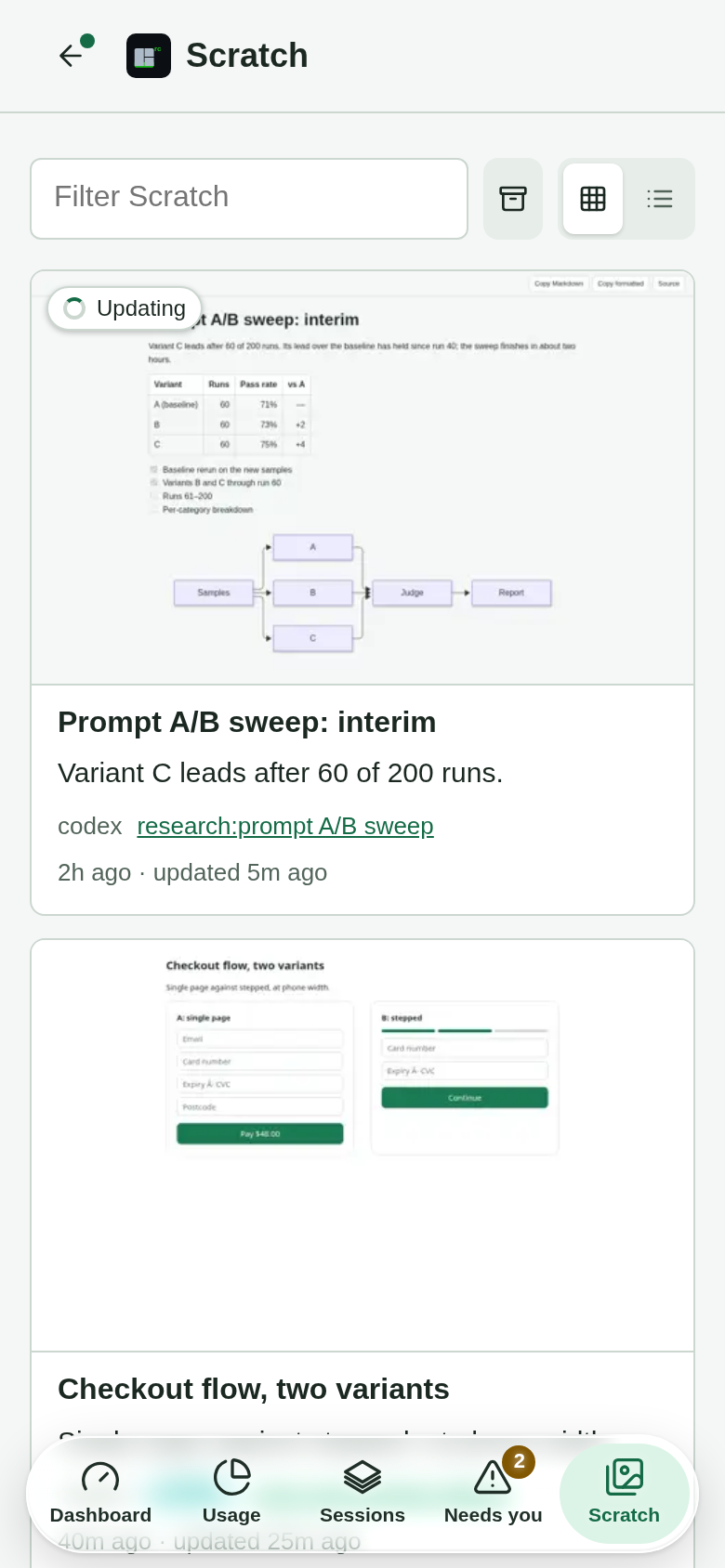
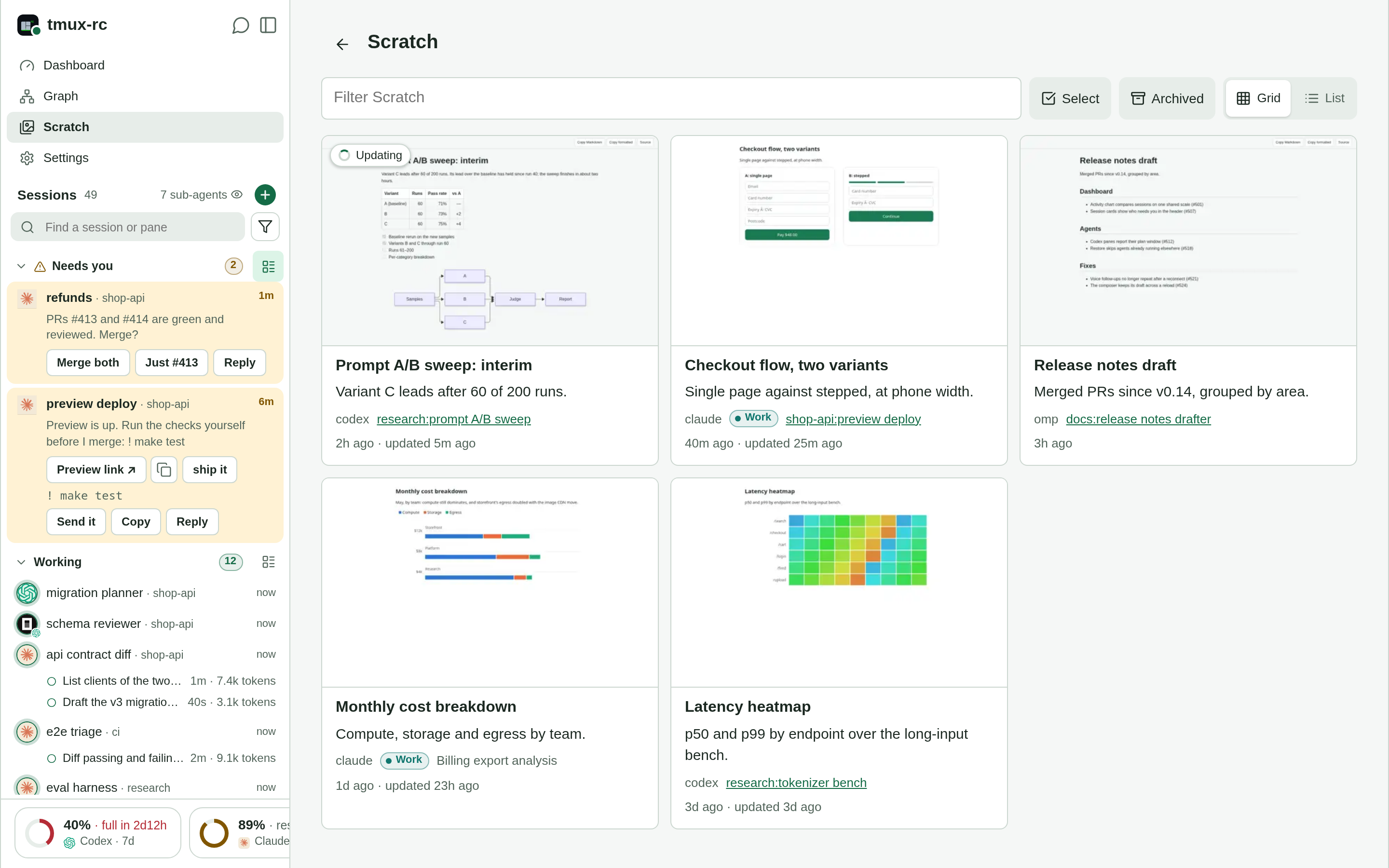
/scratch/ lists every page, most recently changed first, as a card: a thumbnail, the
title, one line of description, when it was made and changed, and who made it. The app
shows it as Scratch: a tab in the phone’s tab bar, a place in the wide sidebar.
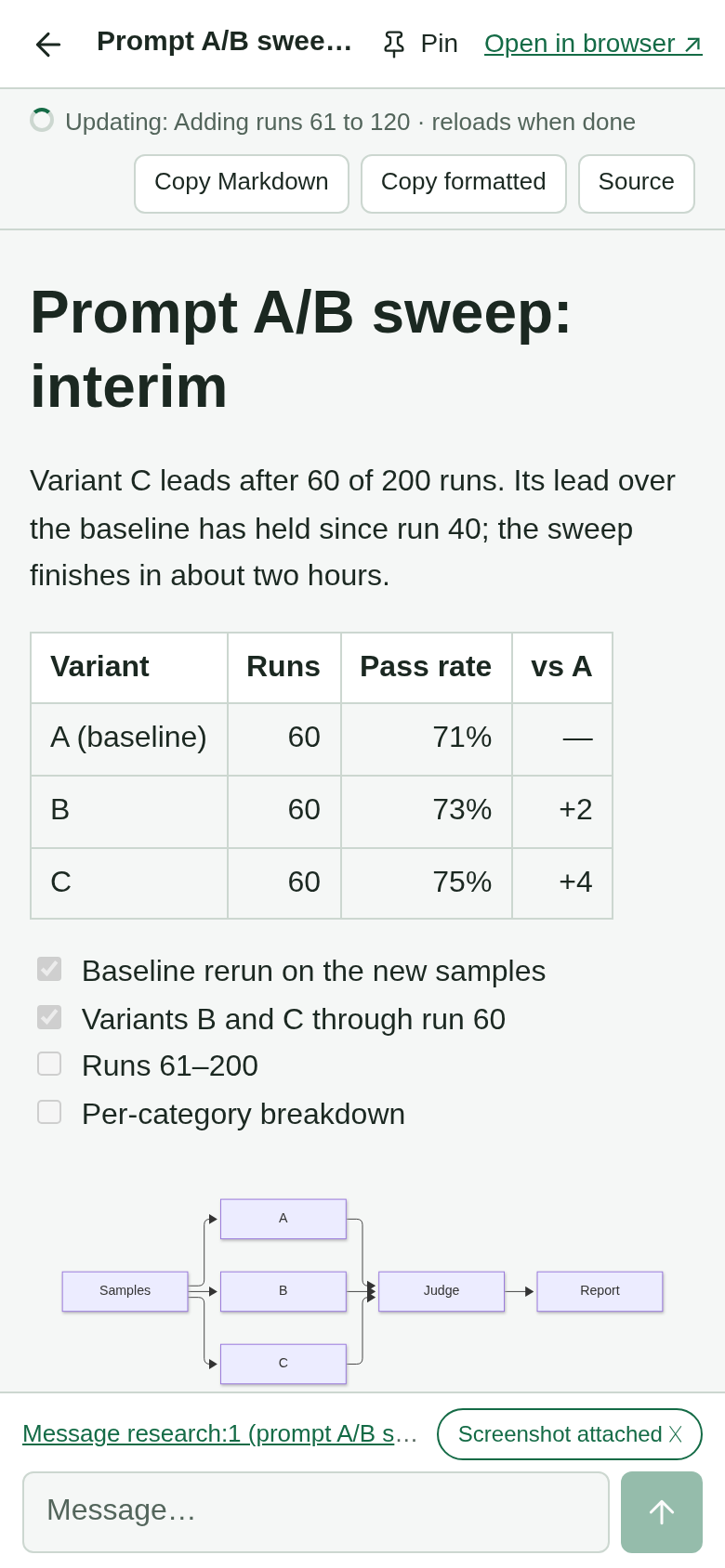
- Open a card and the page fills the screen over the app, under a slim bar. Back, Escape or a swipe from the left edge returns to the gallery; Open in browser gives the page a window of its own.
- Who made it names the session and window, the agent and its account, and links to that pane while it is open. Tap it to jump there. The trail runs both ways: a pane’s overview lists, under Links, its pages still in progress and its newest one, and Scratch pages opens the gallery filtered to that pane.
- Filter by typing, or tap an agent’s chip; Grid and List switch between full cards and compact rows.
- Select (on a phone, press and hold a card), then Archive. An archived folder moves to the Archived shelf, where it is restored or deleted for good; its link keeps working, because links sit in chats and notes and a 404 there would make archiving feel like deleting. Only the Archived shelf deletes, so a slip in the gallery costs an Undo, never a page.
- Pin a page from the viewer’s bar and it joins the app’s menu, up to six, on every
device. The daemon keeps them in
pins.jsonbesideaccounts.json. A pin shows the page’s title, andmeta.json’s optionalicon, a Lucide name, only when the app ships that glyph: the menu is same-origin with the API, so the app never draws markup a page supplies. - Stays current: an open gallery asks every five seconds whether anything changed and reloads if so, except while a filter is being typed or cards are selected.
A link handed out before its page
Agents hand out a link before the page exists (“a subagent is building it, it will be at
/scratch/x/”). A folder whose meta.json came first is In progress: its link shows a
placeholder with the title, who is making it and what that pane is doing right now, and
turns into the page the moment index.html or index.md lands. The card in the gallery
spins the same way. Once the agent’s pane has closed, or sat idle for thirty minutes, the
card says Stopped: the agent gave up without publishing.
When the page lands, every subscribed device gets one push, Ready: <title>, whose tap
opens the page in the app. It is a notification of its own, never swallowed by the pane’s
Needs-you; what keeps one finish to one buzz is that for two minutes after a Ready, that
pane’s plain “turn ended” Needs-you is skipped (a question still notifies). A page
published in one go was never promised and does not notify.
The same holds for revisions. An agent reworking a published page marks its meta.json
"updating": "<what's changing>"; the card and the viewer read Updating, and the
mark’s removal sends a push, Updated: <title>. A Markdown page also carries a thin bar
saying what is changing and reloads itself when done; an HTML page is served as it is, so
reopen it. There is no status database behind any of this:
the state is read from the folder itself, so an agent that crashes cannot leave a stale
“done”, and it survives a daemon restart.
Answering the maker
The viewer’s footer is a message box addressed to the pane that made the page, the same
composer as the pane’s own. A message opens with Re scratch <folder>: so the agent knows
which page you mean, and by default carries a screenshot of the page: the daemon draws
it afresh at your screen’s width and theme, the whole page from the top (cut at 6000
pixels), so “the chart on the right is wrong” needs no further description;
Screenshot attached toggles it off. The box appears only while
that very pane is still open, never for another pane that later took its id.
A page can also offer replies of its own, two ways, and neither sends anything by itself.
A draft: inside the app’s viewer the page posts {pane, draft} to its parent, and a page
opened in a tab of its own links to the app with the draft in its hash
(/m/#pane=%25N&draft=<text>); either way that pane’s composer opens with the text in it,
for you to edit and send. Or the page asks the app to send one line: the app raises a
sheet of its own, outside the page, that quotes the line, names the pane and the page that
asked, and sends only on your tap. Pages are sandboxed (the daemon’s API is as foreign to
them as any other site), so these are the only ways a page gets a word to an agent.
The ask is {intent: "send", pane, text}, and the app checks it first: one line of at
most 500 characters, no control characters, and a pane in the feed that runs an agent,
never a plain shell, where the line would run as a command. The send is bound to the
pane’s process as it was when asked, so a recycled id gets nothing. Only the page the
viewer opened can ask: after its first load the app sandboxes the frame for every later
document, so a page it navigates to runs no script (open such a page from the gallery or
in a tab for its scripts). Send ignores taps for its first half second, and there is no
“don’t ask again”, since a silent send is exactly what an injected page would want. A
page in a tab of its own can’t ask at all; its buttons stay draft links.
Markdown pages
A .md file opens as a rendered page, and a folder whose page is index.md is served at
/scratch/<folder>/ (an index.html beside it wins). The dialect is MkDocs Material’s,
plus GitHub’s callouts: tables, task lists, footnotes, definition lists, heading anchors;
fenced code highlighted on the server; ```mermaid fences drawn as diagrams in the
page’s light or dark theme; !!! note "Title" admonitions, collapsible ??? ones, and
> [!NOTE], [!TIP], [!IMPORTANT], [!WARNING], [!CAUTION]; raw HTML such as
<details>, with markdown="1" to render Markdown inside it. Relative links to other
.md files open rendered too. The toolbar copies the Markdown, or the formatted page for
pasting into a mail or a doc, and Source shows the file itself. Nothing needs setting
up: the renderer ships with the daemon. Why Markdown gets a renderer of its own:
design note
.
Scratch and Claude’s Artifacts
Claude can also publish a page as an Artifact on claude.ai. Both show you a page an agent made; Scratch differs in three ways, and each matters for review:
- Reviewed where the work happens. A page sits beside the repo, the build and the pane that made it, so it can be the build’s real output or a mock of the very UI being changed, and its card links straight back to the agent you will answer.
- Nothing to upload, no hosted service. The files reach only your own devices, through your own front door, so an agent can put private code, costs or unreleased work in a page without asking whether it may, and no outside service’s quota or outage stands between you and it.
- No vendor lock-in. Any model, any harness, any script that writes a file can publish a page, so switching agents, or running several side by side, changes nothing about how you review their work.
An agent with both tools will reach for whichever its instructions favour, so the rest of the difference, where the page lives and who it is for, is worth spelling out.
| Scratch | claude.ai Artifacts | |
|---|---|---|
| Where the content lives | A folder on your machine, served by your daemon | Anthropic’s hosting, in your claude.ai account |
| Who can see it | Whoever passes your front door (Tailscale, your tunnel’s login, or just localhost): everyone who can reach tmux-rc sees every page | Private to you until you share it; then anyone with the link, or the people you share with |
| Who can make one | Any agent in any pane: Claude Code, Codex, Gemini CLI, OpenCode, omp, a shell script, you with cp | Claude, in claude.ai or through Claude Code’s Artifact tool |
| What it can be | Anything static: HTML with its assets, rendered Markdown, images, PDFs, a built site, a whole folder of files | An HTML page (with supporting files) or a document; typed artifacts such as slides and dashboards |
| Scripts on the page | Run, but sandboxed: no fetch, XHR, WebSockets or form posts, no storage. Data is inlined | Run, with browser storage per artifact and, when granted, runtime capabilities: shared state, live data, asking Claude, files |
| Knows its maker | Yes: the card names the session and pane, links to it while it runs, and the viewer messages it with a screenshot | Comments on the artifact reach the Claude session that made it |
| Lifetime | Until you archive or delete it; it is on disk, so it comes along in tmux-rc export and in your backups | Kept in your account, with versions, until deleted |
| Size | Your disk | 16 MB per page |
Which to use follows from the first two rows. Scratch is for work about this machine:
a mock of the UI an agent is changing, the build output of the site in the next pane, a
report that quotes your private repos or costs, anything a non-Claude agent produced, and
anything that should sit in the fleet’s own trail of links and notifications. The files
never leave your machine except to your own phone through your own front door, so an agent
can put things there it must never post anywhere public. One exception to know: with the
parse model configured, a page whose meta.json has no description has its title and
visible text sent to that model for a one-line description, so agents should write the
description themselves (the snippet does), or set TMUXRC_NO_LLM=1. An Artifact is for a page that has
to outlive your front door: something to hand to people who cannot reach your tmux-rc,
a page that needs live data or state shared between viewers, or work done in claude.ai
rather than in a pane. The one hazard is an agent that defaults to the hosted one for a
preview of private work; the snippet below tells it which to use, and that line belongs in
the same instructions file as the rest.
Setting it up
The gallery needs a directory the daemon serves and agents that know about it.
- Serve the directory: set
TMUXRC_SCRATCH_DIRin the daemon’s.envand restart, as in Previewing work . That page also covers your scratch URL per access method, the sandbox, and troubleshooting. - Tell agents where it is:
TMUXRC_SCRATCH_ADVERTISE=1, withTMUXRC_SCRATCH_URLset to your tmux-rc URL plus/scratch, exportsTMUXRC_SCRATCH_DIR,TMUXRC_SCRATCH_URLandTMUXRC_SCRATCH_LOCAL_URLto new tmux panes (details ). - Tell agents what to do with it: paste the snippet below into their global instructions,
such as
AGENTS.mdorCLAUDE.md(one file for every agent ).
The agent snippet
If TMUXRC_SCRATCH_DIR is set, you can show the user a preview (an HTML page, a
Markdown document, a built static site, a report, images, a PDF). Write it into a
new subfolder as index.md (Markdown, with Mermaid diagrams, admonitions, task lists
and tables) or index.html, for example $TMUXRC_SCRATCH_DIR/<folder>/index.md, and
give the user $TMUXRC_SCRATCH_URL/<folder>/ (or the folder's path if that variable
is unset). The public URL sits behind the user's login, so to check the page
yourself request $TMUXRC_SCRATCH_LOCAL_URL/<folder>/ instead; exactly 200 means it
is served (a 202 is a page still in progress). Everything in that directory is
visible to everyone who can reach tmux-rc: never put secrets or private data there.
Pages are sandboxed: their scripts cannot fetch, use XHR or WebSockets, or submit
forms, so inline any data a page needs. Write the folder's meta.json ({"title",
"description", "pane": "$TMUX_PANE", "created": ISO 8601 time}) first, before the
page: until index.html or index.md lands, the link shows that the page is in
progress, so it is safe to hand out early, and the user is notified when it is
ready. To revise a published page, set "updating": "<what's changing>" and "pane":
"$TMUX_PANE" in its meta.json before you start, and remove "updating" when you are
done. A message that starts with "Re scratch <folder>: " is the user's feedback on
that page: revise the files in that folder and reply with the same link. Put every
page made for the user here, never on a hosted artifact, even when a tool's own
instructions say to publish one.
What a card shows, and where it comes from
A folder describes itself in an optional meta.json beside its page: title,
description, pane (the agent’s $TMUX_PANE), created (ISO 8601) and, while it is
being revised, updating. Without one, the title is the page’s own <title> (a Markdown
page’s first heading), else the folder’s name, and the times are its files’ oldest and
newest. A malformed meta.json counts as absent.
tmux-rc fills in the rest in the background, so the gallery never waits for it:
- Thumbnails. If Playwright’s headless Chromium is installed (
make screenshotsinstalls it, or runnpx playwright install chromium-headless-shell;TMUXRC_THUMB_BROWSERnames another binary), each page is shot into athumb.webpbeside it, and again after the page changes. Pages are shot offline, in a throwaway profile, by a listener that serves scratch and nothing else, so a page can put nothing but scratch into its thumbnail. - Descriptions. With the parse model configured, a folder without a description gets
one sentence, written into its
meta.jsonand marked"generated": ["description"]. A description already there is never replaced. - Who made it. While the pane named in
meta.jsonis open, the card links to it (a Codex pane is checked against the transcript first, since Codex’s shared app server stamps every session’smeta.jsonwith its first pane). For a page being updated, the session asked for is the reviser’s, active when theupdatingmark was written. Otherwise tmux-rc asks agent-history which session was active when the folder appeared and mentioned its path, and writes the answer intometa.jsonas"agent_session", marked generated, so each folder is searched once. An orchestrator that hands out a subagent’s link writesmeta.jsonwith its own$TMUX_PANE, since the subagent runs in that pane; a worker in another pane rewrites it with its own when it starts.
The reasoning behind the gallery, the sandbox, the sidecars and the archive is in the design note .